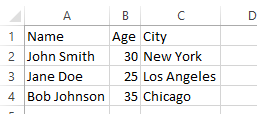
This code creates a C# DataTable with three columns: “Name”, “Age”, and “City”, and three rows of sample data. Then it calls the DataTableToCsv() method which takes the DataTable as an argument and returns a string in CSV format. The returned string is then written to a file named “data.csv” using the File.WriteAllText() method.
using System;
using System.IO;
using System.Linq;
using System.Data;
using System.Text;

class Program
{
    static void Main()
    {
        // Create a DataTable with some sample data
        DataTable table = new DataTable();
        table.Columns.Add("Name", typeof(string));
        table.Columns.Add("Age", typeof(int));
        table.Columns.Add("City", typeof(string));
        table.Rows.Add("John Smith", 30, "New York");
        table.Rows.Add("Jane Doe", 25, "Los Angeles");
        table.Rows.Add("Bob Johnson", 35, "Chicago");

        // Convert the DataTable to a CSV string
        string csv = DataTableToCsv(table);

        // Write the CSV string to a file
        File.WriteAllText("data.csv", csv);
    }

    static string DataTableToCsv(DataTable table)
    {
        StringBuilder sb = new StringBuilder();

        // Get the column names
        string[] columnNames = table.Columns.Cast<DataColumn>().
                                              Select(column => column.ColumnName).
                                              ToArray();
        sb.AppendLine(string.Join(",", columnNames));

        // Loop through the rows and get the data
        foreach (DataRow row in table.Rows)
        {
            string[] fields = row.ItemArray.Select(field => field.ToString()).
                                            ToArray();
            sb.AppendLine(string.Join(",", fields));
        }

        return sb.ToString();
    }
}
CSV is created and data is written to the file.