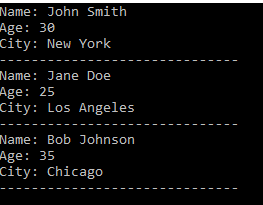
This code reads a CSV file named “data.csv” and converts it into a DataTable. It then loops through the rows of the DataTable and displays the data for each row.
using System;
using System.IO;
using System.Linq;
using System.Data;

class Program
{
    static void Main(string[] args)
    {
        // Read the CSV file into a DataTable
        DataTable table = CsvToDataTable("data.csv");

        // Loop through the rows and display the data
        foreach (DataRow row in table.Rows)
        {
            Console.WriteLine("Name: " + row["Name"]);
            Console.WriteLine("Age: " + row["Age"]);
            Console.WriteLine("City: " + row["City"]);
            Console.WriteLine("------------------------------");
        }
    }

    static DataTable CsvToDataTable(string filePath)
    {
        DataTable table = new DataTable();

        // Read the CSV file into a string array
        string[] csvData = File.ReadAllLines(filePath);

        // Get the column names
        string[] columnNames = csvData[0].Split(',');
        foreach (string columnName in columnNames)
            table.Columns.Add(columnName);

        // Add the data rows
        for (int i = 1; i < csvData.Length; i++)
        {
            string[] data = csvData[i].Split(',');
            table.Rows.Add(data);
        }

        return table;
    }
}
CSV File data is imported to datatable and displayed on console.